WoW grinding bot: farms mobs on the routes you record
Record a lap and the bot walks it, picks targets, kills, loots and skins. It rests between fights, flies to town when bags fill up — and switches routes on its own when a spot gets old.
- Routes and sub-profiles
- Skyriding and Steady Flight
- Town trips and mail to an alt
Windows 10 and 11 · version 0.9.15 · 48.2 MB
Free until November 17
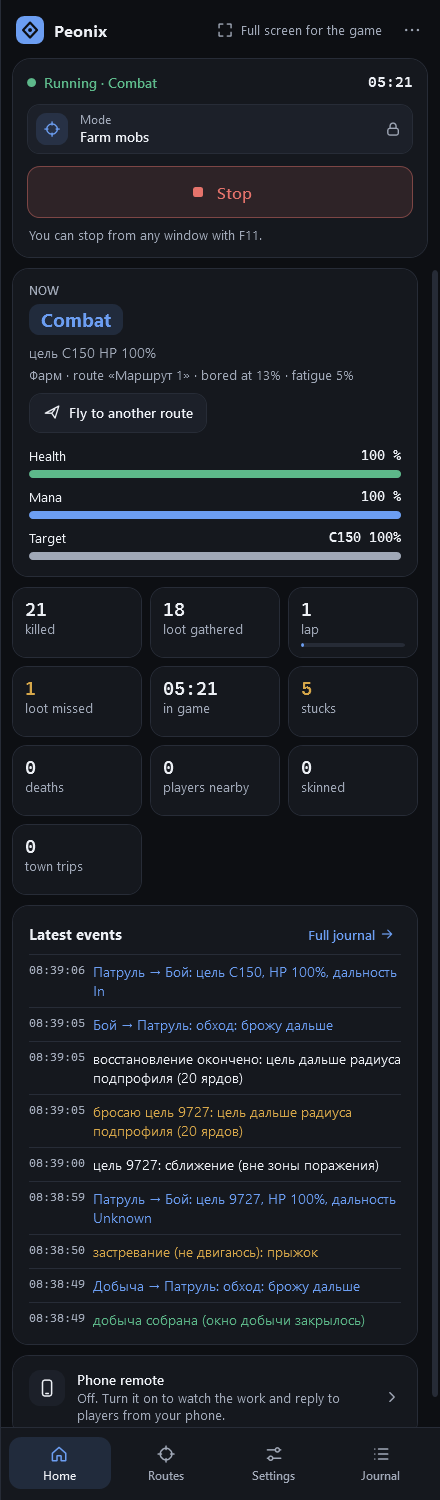
What it looks like in the game
What the bot does
Routes and sub-profiles
A farm profile holds sub-profiles for different levels and spots: level range, class, faction, allowed and banned NPC IDs. Profiles import and export as JSON.
Rotation-based combat
Fights with your spec’s rotation book: interrupts, health-based defensives, big cooldowns on elites. Out of sight or immune targets are noticed and dropped.
Loot and skinning
Loots after combat and between pulls, handles AoE loot, skins beasts and dragonkin, and skips corpses it can’t reach.
Town, mail and supplies
Sells junk and repairs at a vendor you save, restocks food and water, mails whitelisted items to an alt and flies back to the routes.
Flying between routes
Skyriding with Second Wind, or Steady Flight. Record a flight path and it flies it — slightly differently each time. “Test the flight” shows it in advance.
Getting unstuck
When stuck, it works through options: its own trail, route points, hugging the obstacle, taking off. Hard spots are remembered between sessions.
How to start
- 1
Pick the mode
On the app’s Home page, choose the “Farm mobs” card. You can switch modes any time the bot is stopped.
- 2
Record a lap
Routes tab → “Record a route”: walk a loop in the game, return to the start and click “Finish recording”.
- 3
Save a vendor
Open a blacksmith or armorer and click the button the addon adds under the vendor window — for selling junk and repairs.
- 4
Press Start
Setup on the Home page tells you what’s still missing. To stop — Stop or F11 from any window.
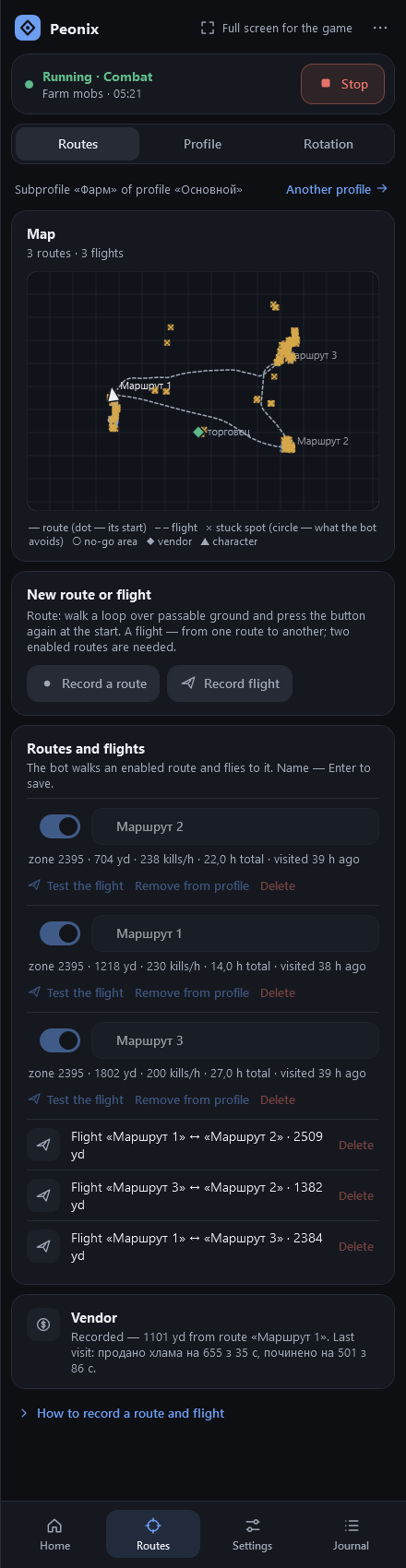
How the bot decides where to farm
A profile can hold many routes. How long the bot stays on each is decided fresh every time: usually around your median (40 minutes by default), sometimes half or double that. It leaves earlier if it’s crowded, mobs thin out, it died, or the path is blocked. The next route is picked the way a player would: not visited lately, good hunting, not too far — always with some randomness.
It only leaves at a calm moment: out of combat, no loot on the ground, healthy. Sometimes it “changes its mind” and stays a little longer, so route changes never look scheduled.
Roaming inside the route
The bot doesn’t walk the line like a train on rails. At random moments it wanders into the area the route encloses — up to 100 yards in — and rejoins further along. You choose how much time it spends off the line: a quarter, a third or half. Spots where it got stuck go on a stuck map, and it stays away from them.
Resting, dying and town
- New fights start only with enough health and mana. It uses food, drink and heals from your buttons and checks the resource actually goes up.
- Death: release, fly to the corpse as a ghost, resurrect, rest. The killer is blacklisted for 10 minutes.
- Two deaths on a route within half an hour mean a route change; three in an hour stop the bot.
- Town trips trigger on full bags, low durability, missing supplies or enough mail to send. Thresholds are yours to set.
Mail is off by default and only sends item IDs you list explicitly — your gear never ends up in the list on its own.
Safety in this mode
The path differs slightly every lap; targeting keeps a calm rhythm, Tab every 1–3 seconds.
Two or more players nearby for most of three minutes — it moves to another route and avoids it for half an hour.
Whisper, invite, duel, trade or someone following — it stops, screenshots, saves a report and logs out.
FAQ
How many routes can one profile have?
As many as you like. Routes live in a shared library, and one route can be attached to several sub-profiles without copies. The bot moves between them on its own.
Can the bot skin mobs?
Yes. With the profession enabled it interacts with the beast or dragonkin again after looting, waits for skinning to finish and takes the materials.
What if my bags fill up and no vendor is saved?
The bot keeps going — it just won’t sell junk or repair. The Vendor line on the app’s Home page explains how to save one.
Can it level a character from scratch?
Yes: sub-profiles with level ranges switch automatically as the character grows. You record routes for each stage in advance.
Other modes
Gathering
Herbalism, mining and lumber — from the air or on the ground.
- Whole-zone sweep, no routes needed
- Nodes by minimap icons
- Node map: 1.3–3× more nodes
Combat assistant
You steer, the bot presses the rotation. Anywhere, even raids.
- All 40 specs, 13 classes
- Presses at GCD end, zero downtime
- F11 pauses instantly
Three modes, one app
Mob grinding, herb and ore gathering and the combat assistant — one install, one subscription. Free until the free period ends.
Windows 10 and 11 · version 0.9.15 · 48.2 MB