WoW rotation bot: you steer, the bot presses
You move and pick targets; the bot presses combat keys from your spec’s rotation book — at the end of every global cooldown, like a seasoned player. Works in dungeons, raids, the open world and battlegrounds.
- 40 built-in rotations
- Interrupts and defensives
- Group healing for healers
Windows 10 and 11 · version 0.9.15 · 48.2 MB
Free until November 17
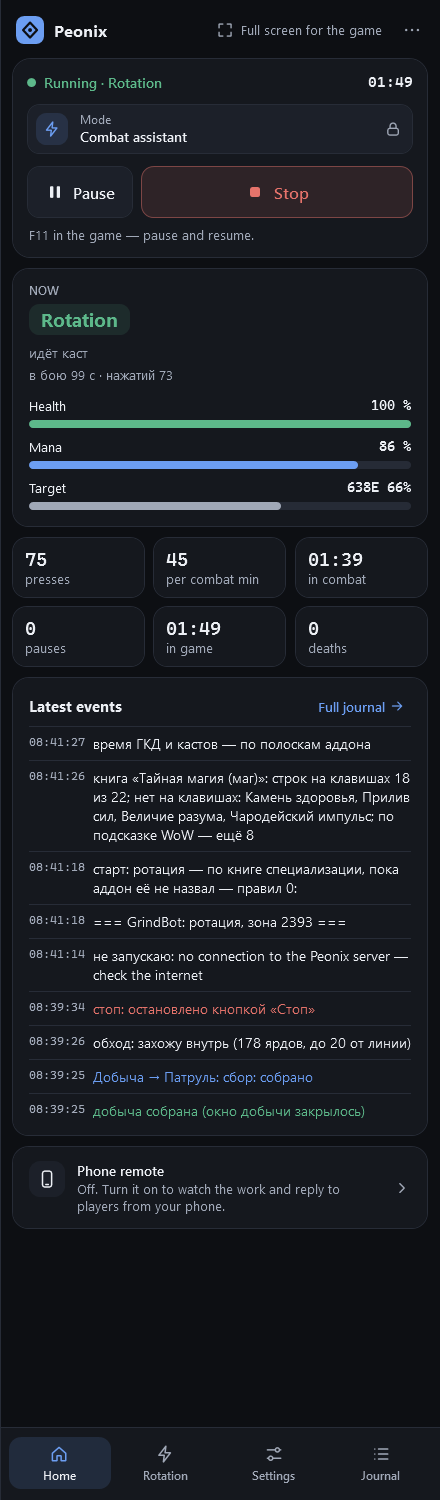
What it looks like in the game
Combat assistant: a healer in a raid
What the bot does
Spec rotation books
Each of the 40 specs has its own book based on SimulationCraft, Method, Icy Veins and Maxroll. The bot finds the book’s spells on your bars by itself.
Precise timing
The addon draws GCD and cast bars, and the bot presses ~120 ms before they end: the game queues the spell, so there’s no gap between GCDs.
Interrupts, defensives, cooldowns
Interrupts target casts, uses defensives by health and spends big cooldowns when the fight deserves it: an elite, a boss, a player or three enemies.
Healers heal the group
It reads party and raid health bars and heals by threshold: the most injured, the tank, yourself. It selects a target for a moment and gives yours back.
WoW hints and the Assistant
Anything on your bars but not in the book gets pressed when the game recommends it, with WoW’s built-in Single-Button Assistant as the last resort.
Your own rules
A key plus conditions: health, resource, target casting, elite or boss. “Build rules” makes them for you from your bars.
How to start
- 1
Pick the mode
On the app’s Home page, choose the “Combat assistant” card.
- 2
Stand out of combat
For a minute out of combat the addon names what’s on each key, and the app remembers it.
- 3
Check the book
Rotation tab: the “Spec book” card shows which spells are missing from your bars.
- 4
Fight
Press Start and play as usual. F11 in game pauses whenever you want to play yourself.
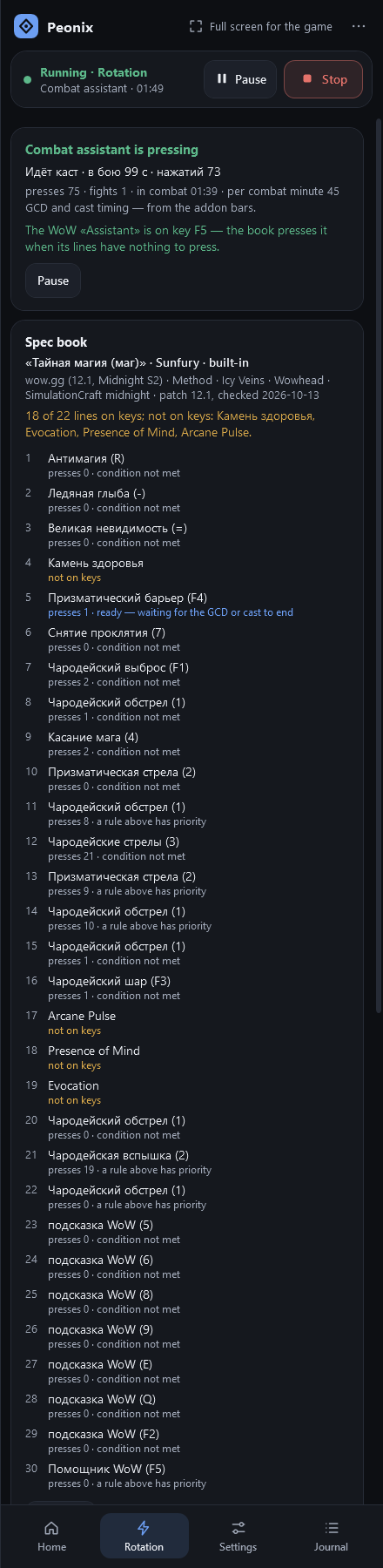
One rotation for every mode
The combat engine is shared: the same book-based fighting runs while grinding and gathering. In Combat assistant mode the bot never moves your character or picks targets — just short key presses in the background.
When the bot stays quiet
- Paused with F11, chat or a menu is open.
- Shift, Ctrl or Alt is held, or you just pressed a key yourself — the quiet window is adjustable.
- Mounted, on a taxi, flying or dead.
- No living hostile target (a healer in combat heals without one).
- You used an item — a trinket, a potion, a healthstone: the bot waits until its cast ends.
Ground-targeted spells
Blizzard, Death and Decay and other ground-targeted spells can’t be placed with a key — the game waits for a mouse click. Put a macro with [@cursor] or [@player] on the button and the bot will use it. Without a macro, you place those yourself.
All 40 specs of all 13 classes
Damage and tank books are built from SimulationCraft priority lists and checked against Method, Icy Veins and Maxroll guides; healer books are written from the guides. Every book shows its patch and verification date.
27 damage specs, 6 tanks and 7 healers
Death Knight
- BloodTank
- FrostDamage
- UnholyDamage
Patch 12.1.5 · Checked October 15, 2026
Demon Hunter
- DevourerDamage
- HavocDamage
- VengeanceTank
Patch 12.1.5 · Checked October 16, 2026
Druid
- BalanceDamage
- FeralDamage
- GuardianTank
- RestorationHealer
Patch 12.1.5 · Checked October 16, 2026
Evoker
- AugmentationDamage
- DevastationDamage
- PreservationHealer
Patch 12.1.5 · Checked October 16, 2026
Hunter
- Beast MasteryDamage
- MarksmanshipDamage
- SurvivalDamage
Patch 12.1.5 · Checked October 16, 2026
Mage
- ArcaneDamage
- FireDamage
- FrostDamage
Patch 12.1 · Checked October 13, 2026
Monk
- BrewmasterTank
- MistweaverHealer
- WindwalkerDamage
Patch 12.1.5 · Checked October 15, 2026
Paladin
- HolyHealer
- ProtectionTank
- RetributionDamage
Patch 12.1 · Checked October 13, 2026
Priest
- DisciplineHealer
- HolyHealer
- ShadowDamage
Patch 12.1 · Checked October 13, 2026
Rogue
- AssassinationDamage
- OutlawDamage
- SubtletyDamage
Patch 12.1.5 · Checked October 16, 2026
Shaman
- ElementalDamage
- EnhancementDamage
- RestorationHealer
Patch 12.1.5 · Checked October 16, 2026
Warlock
- AfflictionDamage
- DemonologyDamage
- DestructionDamage
Patch 12.1.5 · Checked October 16, 2026
Warrior
- ArmsDamage
- FuryDamage
- ProtectionTank
Patch 12.1.5 · Checked October 16, 2026
Safety in this mode
Reactions to combat start and new targets are human-like; early presses and rhythm drift a little.
The status badge over the game window never shows up in screenshots and hides when WoW isn’t in front.
No held keys, no mouse — only short presses.
FAQ
Does the rotation helper work in raids and battlegrounds?
Yes. In Combat assistant mode you move and target yourself and the bot only presses combat keys — that works in any content.
My spec isn’t listed. What happens?
All 40 Midnight specs are built in. If a book doesn’t suit you, the bot follows WoW’s recommendation and the built-in Assistant, and you can write your own rules.
Can I tweak a built-in rotation?
Yes. “My copy” on the Rotation tab puts your spec’s book in the app’s data folder and opens it — it’s plain JSON with lists of spells and conditions. The bot uses it instead of the built-in one from the next start.
How do I pause quickly?
Press F11 from any window: two short tones — paused, press again — resumed.
Other modes
Mob grinding
Grinds your routes: combat, loot, skinning, resting and town trips.
- Routes, sub-profiles and flights
- Sells junk, repairs, mails to an alt
- Moves on when bored or crowded
Gathering
Herbalism, mining and lumber — from the air or on the ground.
- Whole-zone sweep, no routes needed
- Nodes by minimap icons
- Node map: 1.3–3× more nodes
Three modes, one app
Mob grinding, herb and ore gathering and the combat assistant — one install, one subscription. Free until the free period ends.
Windows 10 and 11 · version 0.9.15 · 48.2 MB